

Welcome to the Computer Section @ Chiro.Org! This page contains information about
new and slightly older computer parts that can vastly improve the function
of your office computer system. Build your own box today!


COMPUTERS
This section was compiled by Frank M. Painter, D.C.
Make comments or suggestions at the Contact Us Page
Jump to: The Parts of Your Computer How Fast is Fast?
Some Cost-effective CPU/Mother Board Combination Packages
Build Your Own Box ~ How To Do It Yourself
The Parts of Your Computer
![[A Mother Board]](../computers/GRAPHICS/Mother_Board.gif)
Mother Board: is the heart of the computer; it is the docking space for most of the components of your computer, and it allows all the parts of your computer to receive power and to communicate with one another. Todays mother boards come with built in features like sound cards and USB and network outlets. Once you've selected your CPU you will select a board that fits that CPU. Refer here for more information about Mother Boards.
The newest features are SATA compatible boards, which significantly increase transmission speeds to your hard drive.![[Central Processing Unit]](../computers/GRAPHICS/Intel_CPU.jpg)
Central Processing Unit (CPU): is the "brain" of your computer. It is that portion of a computer that controls and performs the execution of instructions and manages the flow of information through a computer system. CPUs are rated by their speed, the newest rated in gigahertz (GHz, 109, or 1 billion cycles per second). For most office functions, speeds above 1 GHz are more than sufficient.
The only real choices for CPUs are those manufactured by AMD and Intel. Refer here for more information about CPUs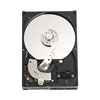
Hard Drive(s): is where the computer stores your data. If you install 2 hard drives, one to control the “operating system” (OS), and the second dedicated to data storage, you might never lose data after a “crash” again, especially if you do regular backups of your data to the 2nd hard drive.
SATA compatible mother boards (ASUS) make it easy to save data to both hard drives at the same time.Operating Systems (OS)
Operating Systems (OS) come in various flavors.
The most common OS is Windows. You can also purchase “open source” systems like Linux, Red Hat or others.
An operating system (OS) is a software program that manages your computer hardware and provides common services for various computer programs.![[RAM Chips]](../computers/GRAPHICS/RAM.jpg)
System Memory (RAM): is the place where the computer holds current programs and data that are in current use. The amount and type of system memory you have is an important contributing factor to overall performance.
In many ways, extra RAM is more important than the processor speed, because insufficient memory can cause a processor to work at 50% below it's performance potential. Some programs are well-known “resource hogs”, so providing more RAM is preferrable. 16 (or more) Gigs is the bare minimum for the newest operating systems.![[Video Card]](../computers/GRAPHICS/Video_Card.jpg)
Video Card: a.k.a graphics card is an “expansion card” that contains the circuitry necessary to create a video signal that can be processed by your computer monitor. Remember that every image you are looking at is actually made up of zillions of tiny dots called “pixils”. High-end video cards have dedicated memory to represent 3-D imaging more quickly and accurately.
![[Sound Card]](../computers/GRAPHICS/Sound_Card_2.jpg)
Sound Card: Mother boards typically come with sound circuitry already built in, so an upgrade is not required. If you want surround sound for your DVDs and CDs, or 3-D sound for games, or the ability to mix your own Midis and music, an add-on soundcard may be just the thing for you.
![[CD-Rewritable]](../computers/GRAPHICS/CD-RW.jpg)
CD-Rewritable: can record on one-time use (CD-R) or multiple-reuse (CD-RW) discs. You can make copies of existing information (music CDs, MP3s, computer programs, or data discs) or you can create “backups” of information already stored in your computer quickly and cheaply.
CDs can hold 750 MB (750 million bits) worth of data. That's about 500 of the old 3½" floppy diskettes !![[DVD-Rewritable]](../computers/GRAPHICS/DVD.jpg)
DVD-Rewritable: are now so inexpensive, it's almost pointless to add a CD-burner to your box! [Plus, new DVD recorders can also burn and read CDs] Blank DVD discs are now as cheap as 10 cents each. You can record on one-time use (DVD-R+ or -) or multiple-reuse (DVD-RW) discs.
DVDs hold 4.5 Gigs (4500 million bits). That's 6 CDs worth of data, all in one place !![[Computer Case]](../computers/GRAPHICS/Computer_Case.jpg)
Computer Case: holds all parts of the computer. You select a box suitable to hold the mother board you have selected. On the front you see expansion bays for CD-RWs and DVDs, and on the back look for at least 5 expansion slots for adding things like modems, firewire ports, and extra USB ports.
For your convenience, make sure your new case has front-side outlets for USBs, headsets with microphones (for SkyPe), and perhaps even Firewire inputs. (for whatever you expect to use frequently.)![[Power Supply]](../computers/GRAPHICS/Power_Supply.jpg)
Power Supply: distributes electricity from the wall outlet to the mother board and case fans via the wiring and sockets that come with the unit. Although many computer cases come with existing power supplies, gamers often upgrade to more reliable high-end power supplies.
![[Floppy Disk Drive]](../computers/GRAPHICS/Floppy_Disk.jpg)
3.5inch 1.44MB Floppy Disk Drive: is an old, reliable, and easy way to copy up to 1.4 million bits of information onto a convenient, portable and low-cost media. CD-RW has all but replaced the need for floppies, but nothing is more convenient for carrying that last-minute Word file home in a hurry! The most recent popular method to carry files home are portable USB storage devices.
![[Modem]](../computers/GRAPHICS/Modem.jpg)
Modems: connect your fax software directly to phone lines. This also used to be our primary access to the internet, until DSL became cost-effective and widely distributed. A modem still a necessary tool for any business office that faxes through the computer.
![[Keyboard]](../computers/GRAPHICS/Keyboard.jpg)
Keyboards: are the way to input your data into the computer.
Do you know about Keyboard Shortcuts?![[Mouse]](../computers/GRAPHICS/Mouse.jpg)
Mouse: The new “optical” mice rule! There used to be a little rubber ball inside old-style mice, and they had a tendency to drag dust inside the working parts of the mouse. Eventually this made the mouse work erratically. The new mice don't usually need a mouse pad either.
![[Mouse]](../computers/GRAPHICS/CPU_Cooling_Fan.jpg)
Processor (CPU) Cooling Fan: Keep your hard-working processor running cool with a fan/heatsink combination designed especially for your CPU. Many of the better CPUs now come with one attached.
The heatsink features ultra-thin fins and an extra-large heat-spreader to efficiently direct heat away from your CPU's sensitive die area. A high-performance ball-bearing fan blows cool(er) air down onto the heatsink and out over your motherboard for extra cooling.
![[SATA Cable]](../computers/GRAPHICS/SATA.jpg)
ATA/IDE Round Cable: I like the round IDE and Floppy cables, because they look cooler than the old flat “ribbon” cables, and because they permit much better air flow across parts that tend to overheat. This connects your hard drive or floppy to the mother board.
The newest advance in design also includes increased speeds of transmission. The SATA (Serial ATA) cable transmits at 150Mbps. This is huge improvement over the older ribbon or round cables which were rated at 100 or 133Mbps maximum.
NOTE: Virtually all new mother boards and hard drives are designed with the 7-Pin Serial SATA sockets.
![[ATA/IDE Round Cable]](../computers/GRAPHICS/Round_Cable.jpg)
How Fast is Fast?
First, you need to decide how fast a processor to purchase. That should be based on how you use your computer. If you are a “high-end user” you may use your computer for 3-D video games or auto-CAD presentations. These are uses which require very high-speed processing. The cost of your CPU, Mother Board, and System Memory (RAM) will be higher since you are looking for the newest and fastest technology available.
If you are an “average user”, you use your computer for word-processing, billing, internet access and e-mail. CPU speed should have minimal impact on your day-to-day needs. Once processing speeds rose above 1 GHz, the average user could not distinguish any real differences in speed. Think about this: If your Word 2003 program already opens in .75 seconds, why would you spend $300 to upgrade your system to make it open a little bit faster?
Internet speed is based on how you access those services. Modem dial-up is the wave of the past, and is limited by the slow speed of your modem. DSL is now prevalent and inexpensive, and offers high-speed 24/7 access. When I ditched “dial-up” and switched to DSL, I actually saved money on my monthly phone bill.
Some Cost-effective CPU/Mother Board Combination Packages
I used to list motherboard amd processor packages here, but since I'm always looking at last year's models (to hold down cost) they sell out and the links go dead faster than I can keep up with it. Pick your processor (AMD or Intel) and then select a motherboard designed to work with that processor.
I prefer to purchase from a store rather than online vendors, because service matters. I have a MicroCenter nearby, and their prices are fair. Better yet, if there is a problem, I get free and (almost) immediate service.
Comments From AMD:
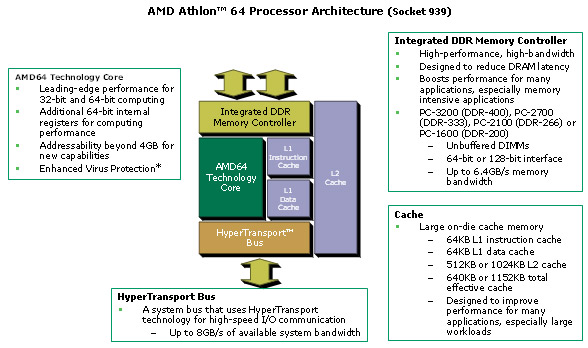
The AMD64 core provides leading-edge performance for both 32-bit and 64-bit applications
- AMD64 technology provides full-speed support for x86 code base without compromising performance
- 40-bit physical addresses, 48-bit virtual addresses
Sixteen 64-bit integer registers
- Sixteen 128-bit SSE/SSE2/SSE3 registers
- AMD Digital Media XPress™ provides support for SSE, SSE2, SSE3 and MMX instructions
A high-bandwidth, low-latency integrated DDR memory controller
- Supports PC-3200 (DDR-400), PC-2700 (DDR-333), PC-2100 (DDR-266) or PC-1600 (DDR-1600) SDRAM unbuffered DIMMs (socket 939); supports PC2-5300 (DDR2-667), PC2-4200 (DDR2-533) or PC2-3200 (DDR2-400) SDRAM unbuffered DIMMs (socket AM2)
- Support for 64-bit DDR (socket 939) or DDR2 (socket AM2) SDRAM memory
- Up to 6.4GB/s (socket 939) or 10.6GB/s (socket AM2) memory bandwidth
HyperTransport™ technology for high speed I/O communication
- One 16-bit link up to 2000MHz bidirectional
- Up to 8GB/s HyperTransport™ I/O bandwidth
- Up to 14.4GB/s (socket 939) or 18.6GB/s (socket AM2) total delivered processor-to-system bandwidth (HyperTransport bus + memory bus)
Large high performance on-chip cache
- 64KB Level 1 instruction cache
- 64KB Level 1 data cache
- Up to 1MB (socket 939) or 512KB (socket AM2) Level 2 cache
|
|
There are a variety of "how-to" pages on building your own box. The only stressful part of the whole job is hooking up the tiny wires from the front of the box to power the front-side USBs, the on-off switch and the operating lights. The book that comes with the mother board takes you step-by-step through the installation of every part, in the right order.
Here's a few How-To pages:
Build Your Own PC at PCMechanic

Return to Chiro.Org's LINKS Section

Since 1–20–2006
Updated 7–02–2017
| Home Page | Visit Our Sponsors | Become a Sponsor |
Please read our DISCLAIMER |